
3D Solar Design
3D Solar Design Software for Rooftop Layouts and Quotations
Turn rooftops into professional, presentation-ready solar designs with powerful 3D visualization, and carry the design straight into the quotation. Design on a laptop or a phone, with shading, wind load, string design and a priced bill of materials.
- Rooftop model
- Panel arrangement
- Capacity & yield
- Customer-ready views
- Works on your phone
- Every roof type
- Year-round shading
- Wind load (IS 875)
- Bill of materials
- String design
- Payback and subsidy
- Proposal PDF
What you see on the screen
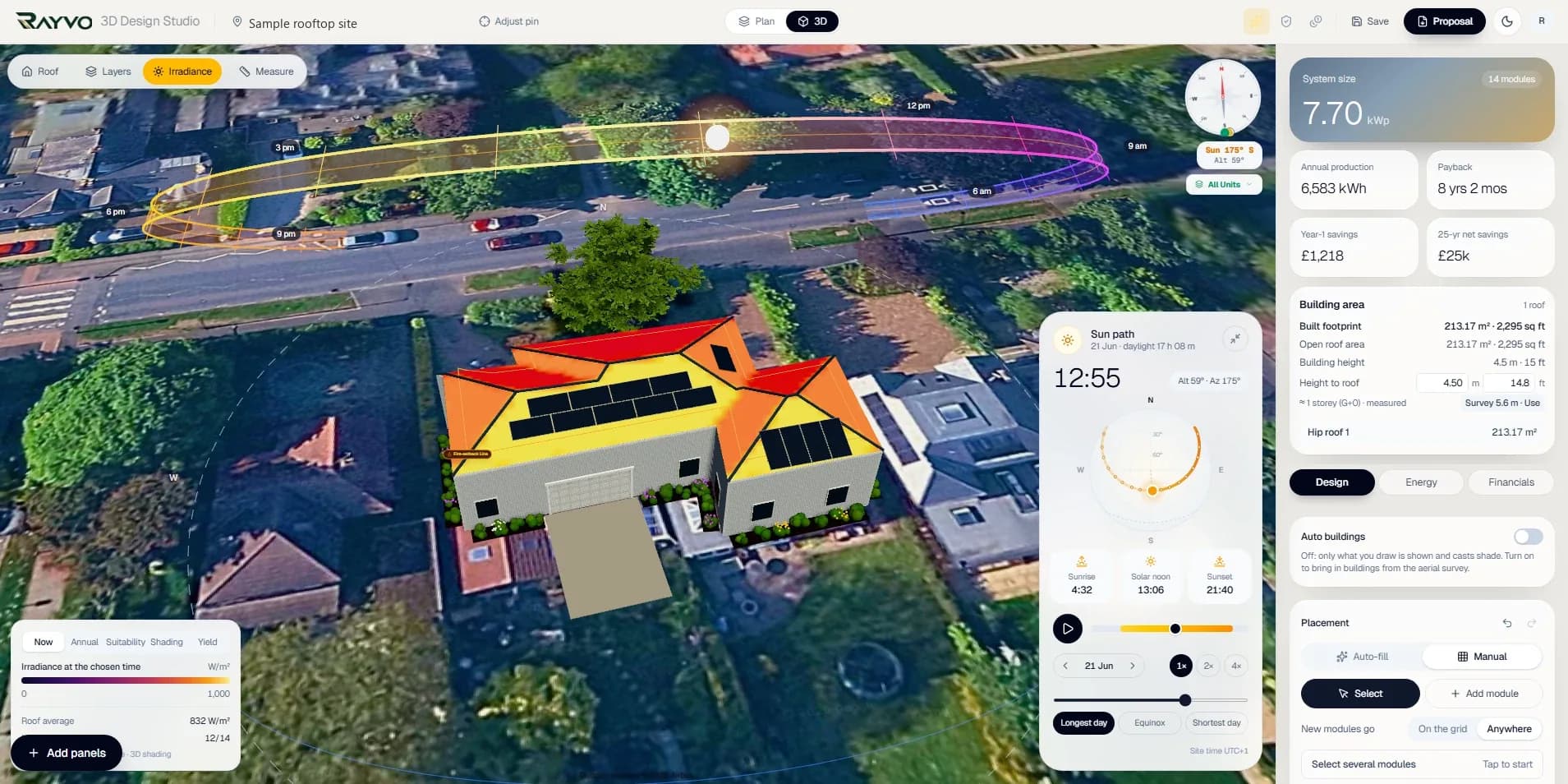
A sample design from the studio, part by part. Every figure is worked out from the drawing.
- 01Sun path and heat mapThe real path of the sun for the day you choose, with a time scrubber and the longest day, equinox and shortest day. The roof is coloured by the sunlight it gets at that moment.
- 02Roof viewsSwitch the roof between Now, Annual, Suitability, Shading and Yield to see where panels earn the most.
- 03System summarySystem size in kWp, module count, annual production, payback, first-year savings and 25-year net savings, updating as you place panels.
- 04Building and heightFootprint, open roof area, storeys and height to the roof, with the height measured from the aerial survey and editable.
- 05PlacementAuto-fill the roof or place modules by hand, on the grid or anywhere, with undo. Trees and neighbouring buildings cast real shadows.
- 06Plan, 3D and proposalMove between Plan and 3D, then Design, Energy and Financials, and send the design out as a proposal.
What goes into the quotation
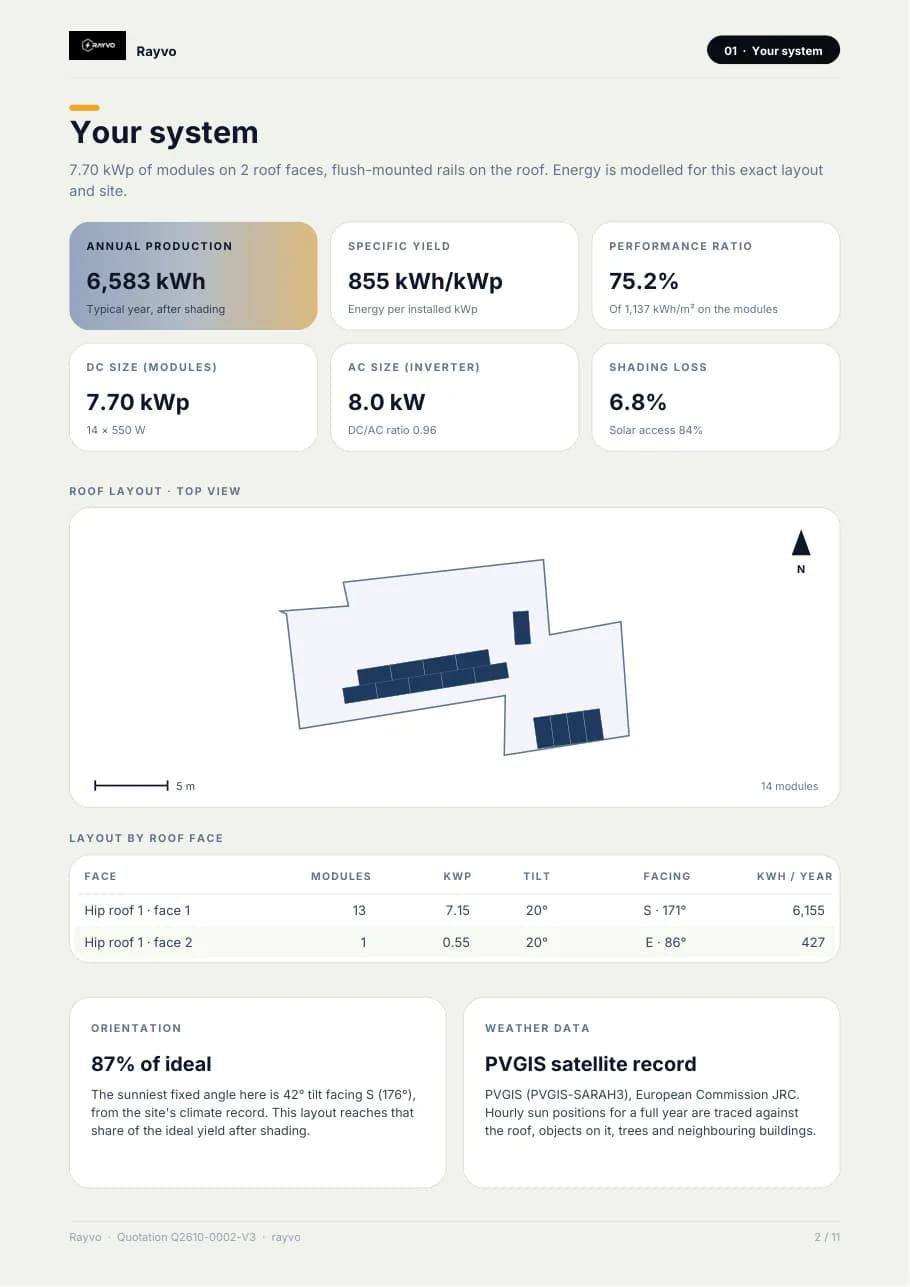
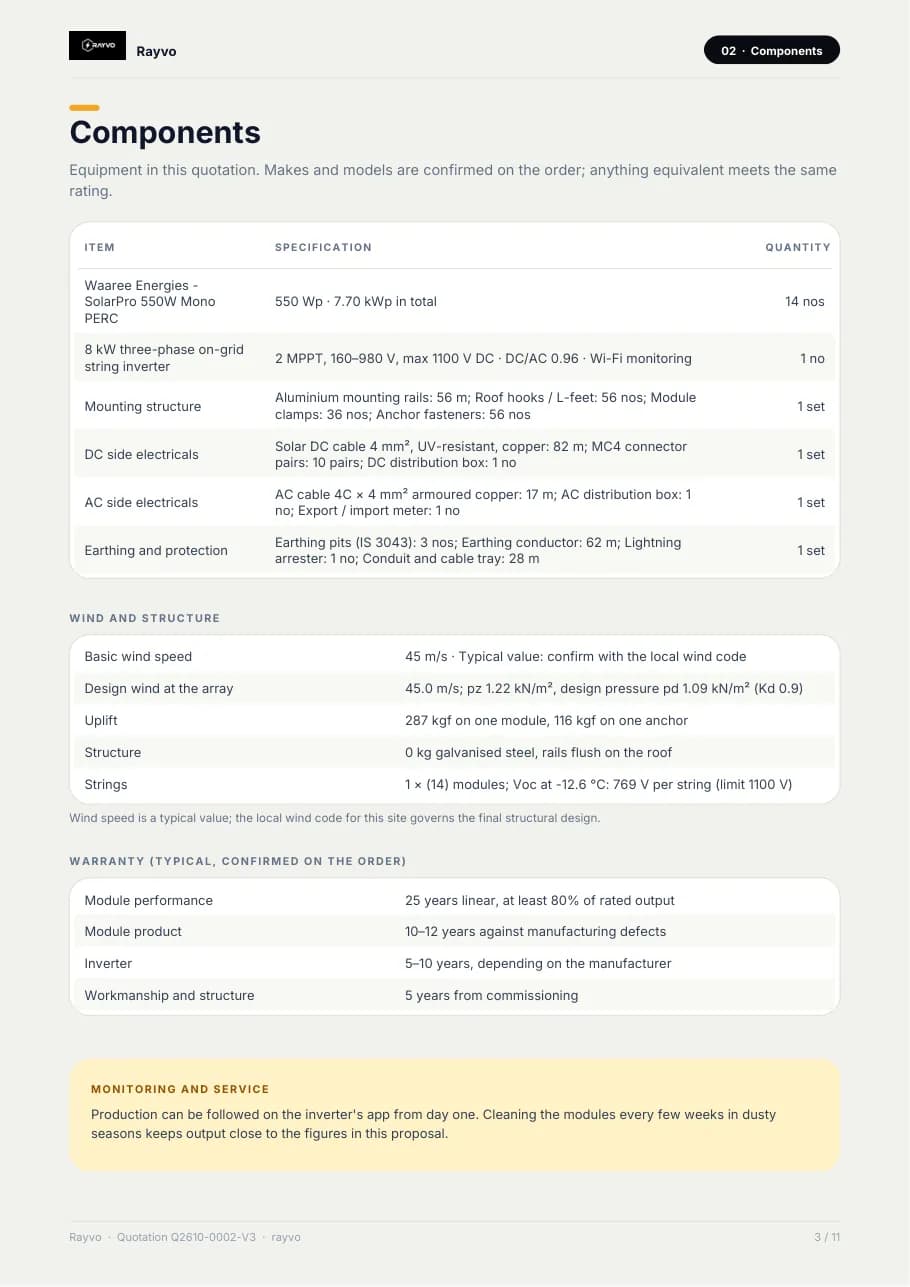
One click makes a branded PDF from the design, about eleven pages, with every figure taken from the drawing. These pages are from a sample UK home; an Indian site uses rupees and the IS 875 wind speed.
- 01CoverQuotation number with its version (for example Q2610-0002-V3), date and validity date, system size and module count, yearly energy, first-year savings, payback and yearly return, who it is for and from whom, the site location, and a link or QR code that opens the live 3D design.
- 02Your systemAnnual production after shading, yield per kWp, performance ratio, DC size, inverter AC size and DC/AC ratio, shading loss and solar access, a top view of the roof with a scale, the layout by roof face (modules, kWp, tilt, facing, yearly energy), how close the layout is to the ideal angle, and where the weather data comes from.
- 03ComponentsEvery item with its specification and quantity: modules, the inverter (type, MPPT range, maximum DC voltage, monitoring), mounting structure, DC and AC electricals, earthing and protection.
- 04Wind and structureThe basic wind speed and its source, the design wind speed and pressure at the array, uplift on one module and one anchor, the structure steel weight, and the string voltage at the coldest temperature against the inverter limit.
- 05Warranty and monitoringTypical module performance, module product, inverter and workmanship warranties, and how production is followed after commissioning.
- 06Price and paymentThe contract value, a payment schedule by milestone with share and amount, and terms: validity, site survey, net-metering fees at actuals, delivery time and what civil work is not included.
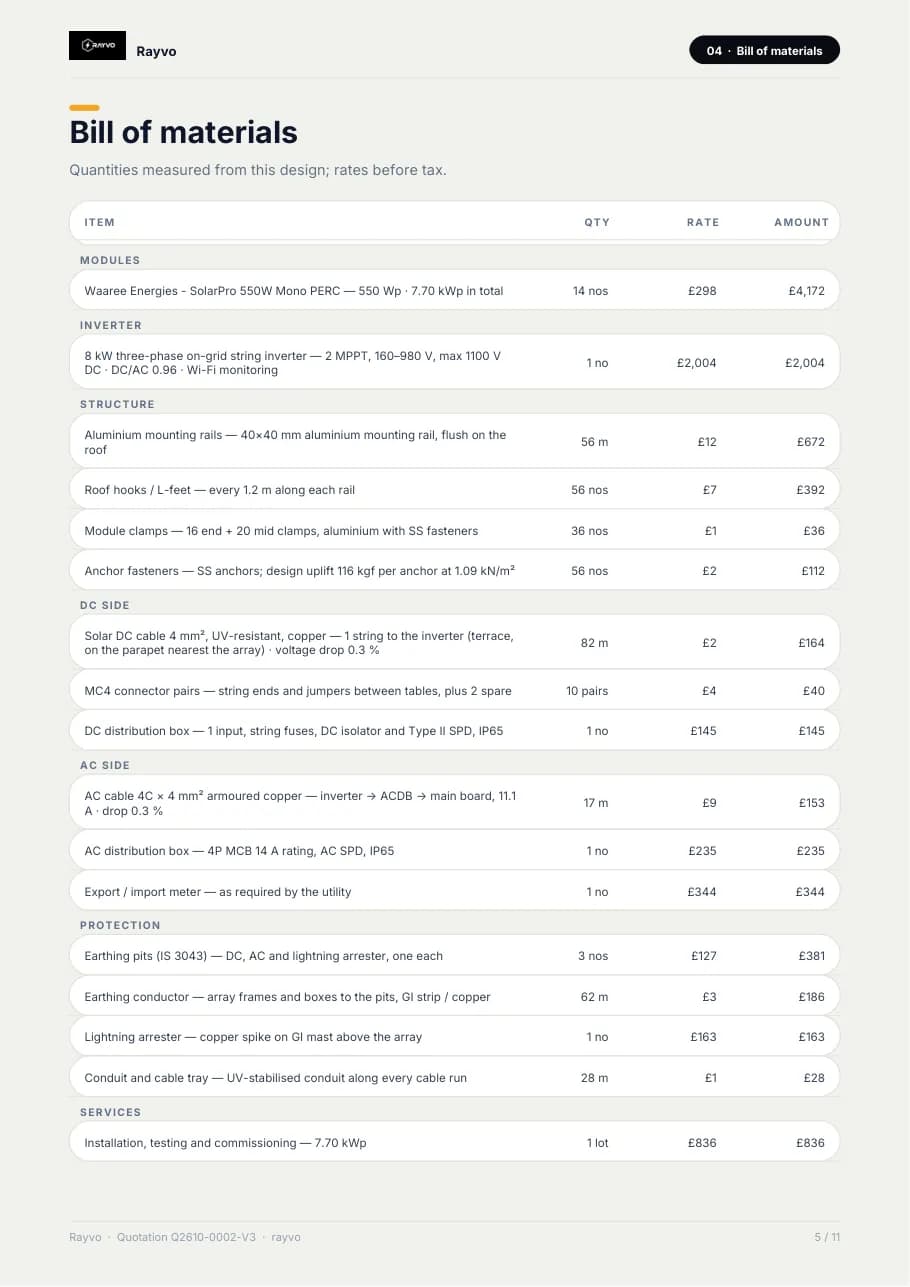
- 07Bill of materialsQuantities measured from the design and priced from your rate card: modules, inverter, structure (rails, hooks, clamps, anchors), DC side (cable, connectors, DC box), AC side (cable, AC box, meter), protection (earthing pits, conductor, lightning arrester, conduit and tray), installation and transport, then the subtotal.
- 08Production month by monthA chart and a table of sun on the modules, energy, kWh per kWp, performance ratio and savings for every month.
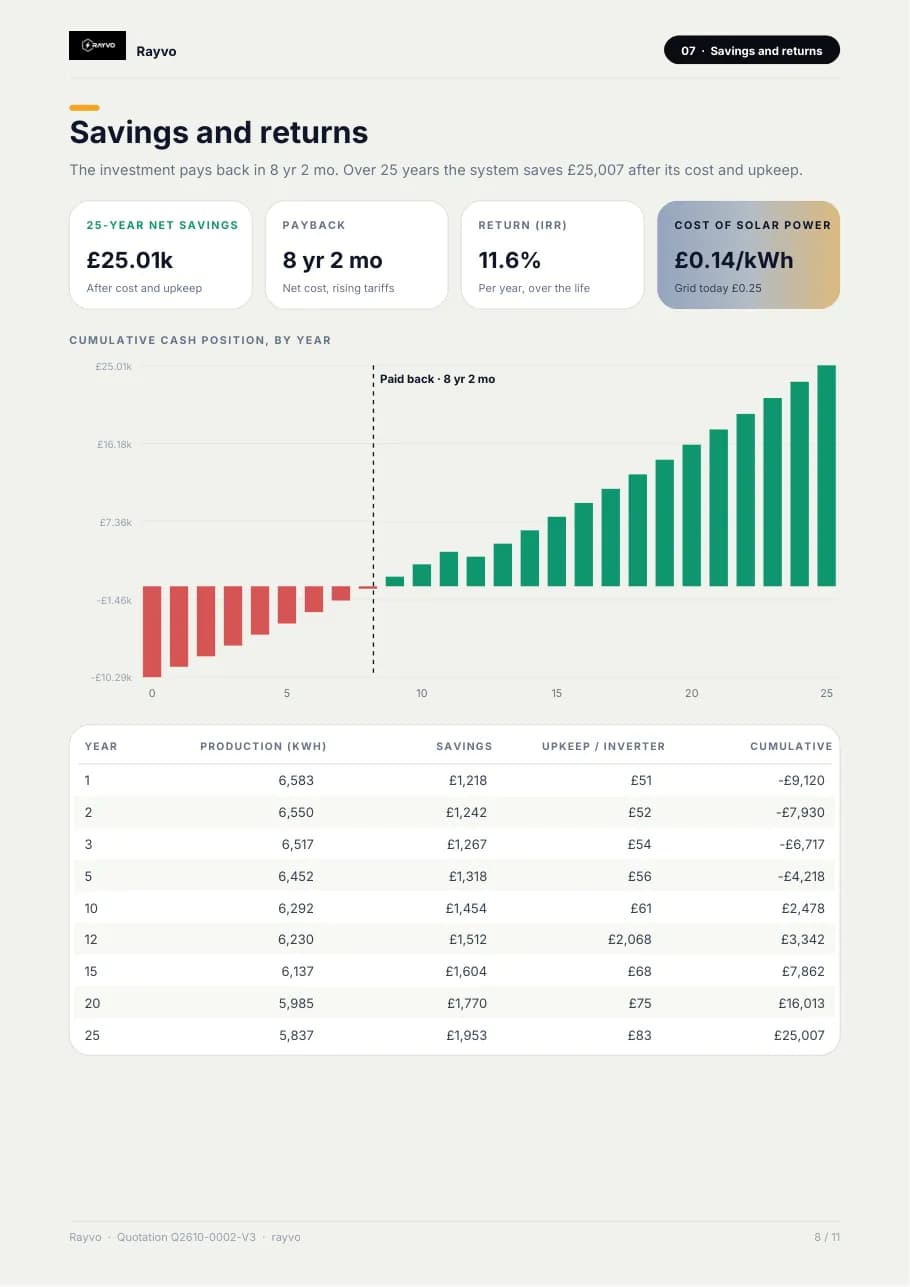
- 09Savings and returns25-year net savings, payback, yearly return, cost of solar power against the grid price, a cash-position chart by year and a year-by-year table that includes inverter replacement. Then the cost of not going solar, and the CO2 avoided with every factor printed.
- 10Assumptions, next steps and acceptanceEvery assumption used (tariff, export credit, self-use share, tariff rise, output loss, upkeep, discount rate, inverter replacement, installed price per watt, system losses), the four next steps, and a signature page to accept the order.
What 3D Solar Design does
Rooftop modelling
Build the roof in 3D with its planes, pitch and obstructions so the design matches the site. Draw the roof as any outline over satellite imagery, with its planes, pitch and height, so the design matches the site.
Every roof type
Flat, gable, shed and hip roofs, including L, T and U shaped outlines, with extra wings and upper storeys on the same building.
Everything on the roof
Place water tanks, a stair room, AC units, a solar water heater, dishes, vents and skylights, plus trees and neighbouring buildings, so keep-out areas and shadows are real.
Panel layout
Place rows and columns of modules, set spacing and orientation, and see the array take shape. Rows and columns by tilt and spacing, with one grid direction for the whole design: best sun side, along the walls or any angle. Rotate or slide the whole array, or tap to place panels.
Design on your phone
The studio runs in the browser on a phone. The design panel becomes a bottom sheet with the system summary, so you can design on site with the customer.
Shading all year
The sun is swept across the 21st of every month in half-hour steps, and every module is checked against buildings, trees, tanks and other rows. Shading loss comes out month by month.
Sun and yield
A sunlight heat map for each roof from PVGIS climate data, a live sun path over the house, and an annual generation estimate that follows from the layout.
Wind speed and structure
Basic wind speed from IS 875 (Part 3) for the nearest listed city, design wind speed and pressure at the array height, and the steel taken off member by member. A structural engineer still designs the actual roof.
Strings and inverter
Inverter size and count, and how the modules are strung, worked out from the datasheet and the site's coldest morning and hottest afternoon.
Bill of materials
Every quantity counted from the design: modules, strings, cable runs, structure, clamps, anchors, earthing and lightning protection. Priced from a rate card you can edit, with DCR or non-DCR modules.
Subsidy and payback
PM Surya Ghar subsidy worked out by rule, and a 25-year cash flow with payback, NPV, tariff escalation and yearly degradation. A system that does not pay back says so.
Capacity and yield
See system size, module count and an annual generation estimate as the layout changes.
Presentation views
Show customers a clear 3D view of what will be installed on their roof.
Linked to the customer
Designs sit with the lead or customer record, not in a separate folder.
Into the quotation
Carry the designed system into a priced quotation without typing it again.
A full proposal PDF
About eleven pages from the design: system, components, wind and structure, warranty, price and payment schedule, itemised bill of materials, month-by-month production, savings and payback, CO2, assumptions, and an order acceptance page. A link opens the live 3D design.
Four steps. One flow.
- 1
Model the roof
Outline the rooftop and its obstructions. Outline the rooftop, its levels and everything standing on it.
- 2
Place panels
Arrange modules and set spacing. Arrange modules, set spacing and the grid direction.
- 3
Check the system
Review capacity and expected yield. Review shading, wind, strings, capacity and yield.
- 4
Share and quote
Present to the customer and price it. Present to the customer and price it from the bill of materials.
3D Solar Design works on the same database as every other RAYVO module. See the plans and pricing, or create your company account to start.
3D Solar Design questions
Rooftop solar systems: the roof and its obstructions, the panel arrangement, and the resulting capacity and yield estimate.
Yes. The 3D view is made to be presented, so a customer can see what will sit on their roof.
Yes. The designed system can be carried into a priced quotation for the same customer.
Yes. The studio runs in the browser on a phone, where the design panel becomes a bottom sheet with the system summary, and panels can be placed by tapping.
Flat, gable, shed and hip roofs, including L, T and U shaped outlines, with extra wings or upper storeys on the same building, and objects such as water tanks, a stair room, AC units, trees and neighbouring buildings.
It shows the basic wind speed from IS 875 (Part 3) for the nearest listed city in India, the design wind speed and pressure at the array height, and takes off the steel for the structure. These figures size the proposal; a structural engineer's design for the actual roof is still needed before installation.
Yes. Quantities are counted from the design (modules, strings, cable runs, structure, clamps, anchors, earthing and lightning protection) and priced from a rate card you can edit. That total is the price used in the proposal.
A branded proposal of about eleven pages made from the design: the cover with quotation number and validity, system size and yield, components, wind and structure, warranty, price and payment schedule, an itemised bill of materials, month-by-month production, savings and payback, CO2 avoided, the assumptions used, next steps and an order acceptance page. Each quotation carries a version number, and a link or QR code opens the live 3D design.
Yes. Every module is checked against buildings, trees, tanks and other rows across the sun's path on the 21st of each month, so the shading loss is shown month by month.
Ready to run your business smarter?
Bring your solar design, CRM, quotations, projects, finance and business operations together with RAYVO.
Or talk to us on WhatsApp at +91 90399 94090